FastCompressor vs TinyPNG: The Honest Comparison (2026)
Quick comparison
| Feature | TinyPNG (Free) | TinyPNG Pro | FastCompressor (Free) | FastCompressor Pro |
|---|---|---|---|---|
| Price | $0 | $39/year | $0 | $19 once — no renewal |
| File size limit | 5 MB per file | 75 MB per file | No limit | No limit |
| Images per session | 20 max | Unlimited | 20 per session | Unlimited |
| Files uploaded to server | Always | Always | Never | Never |
| Works offline | No | No | Yes | Yes |
| Batch processing | Up to 20 | Unlimited | Up to 20 | Unlimited |
| Formats supported | PNG, JPEG, WebP, AVIF, JXL | PNG, JPEG, WebP, AVIF, JXL | JPG, PNG, WebP, TIFF, AVIF, GIF, video | JPG, PNG, WebP, TIFF, AVIF, GIF, video |
| TIFF support | No | No | Yes | Yes |
| Video compression | No | No | Yes | Yes |
| EXIF/metadata removal | Auto (strips on compress) | Auto | Manual | Batch removal |
| Folder watch / auto-compress | No | No | No | Yes (Pro) |
| Windows support | Browser | Browser | Native app | Native app |
| Mac support | Browser | Browser | Native app | Native app |
| Linux support | Browser | Browser | Native app | Native app |
| WordPress plugin | Yes | Yes | No | No |
TinyPNG pricing verified June 2026 at tinypng.com.
Speed benchmark
We compressed the same batch — 100 JPG files averaging 3.2 MB each — with both tools on a MacBook Air M2, 200 Mbps connection.
| Step | TinyPNG | FastCompressor |
|---|---|---|
| Upload 100 files (320 MB) | ~4 min 10 sec | 0 sec (no upload) |
| Server processing + queue | ~25 sec | 0 sec (local CPU) |
| Download ZIP | ~45 sec | 0 sec (saved locally) |
| Unzip and sort files | ~30 sec | 0 sec (output folder ready) |
| Total wall clock time | ~5 min 50 sec | 14 secs |
At 100 files, the upload/download overhead of TinyPNG alone takes over 5 minutes before any compression even happens. FastCompressor's entire pipeline — including compression — runs in under 15 seconds for most batches of this size.
Stop wasting time uploading to servers
FastCompressor batch processes hundreds of images in seconds right on your computer.
Download Free VersionWhat TinyPNG does well (and where it genuinely beats FastCompressor)
Being honest matters here. TinyPNG has real strengths:
WordPress plugin. TinyPNG's WordPress plugin automatically compresses images on upload, in the background, without any manual workflow. FastCompressor has no WordPress integration — if you need automatic WordPress compression, TinyPNG's plugin is hard to beat.
Developer API. TinyPNG's API is well-documented, supports Python, Node.js, PHP, Ruby, .NET, and Java, and is used by thousands of production pipelines. FastCompressor has no API. If you need programmatic compression integration, TinyPNG is the right choice.
Where FastCompressor wins
No upload. Ever. Every image you send to TinyPNG is uploaded to Tinify's servers. TinyPNG states files are deleted after processing — there's no reason to doubt that statement. But for client photos under NDA, images with GPS coordinates, medical images, or sensitive business assets, uploading to a third-party server is a meaningful concern. FastCompressor processes everything locally. Your files never leave your device.
No file size limit. TinyPNG's free tier caps files at 5 MB each. A single RAW export from a modern camera, a Lightroom TIFF, or a high-resolution product photo routinely exceeds this. FastCompressor has no per-file limit — handle 200 MB TIFFs or multi-gigabyte videos without restriction.
TIFF compression. TinyPNG does not support TIFF files at any tier. FastCompressor compresses TIFF losslessly using LZW or Deflate, automatically selected based on the file's bit depth. For photographers, print designers, and archivists, this is non-negotiable.
Video compression. TinyPNG is images only. FastCompressor compresses MP4, MOV, and WebM in the same app — no second tool needed.
One-time price vs recurring subscription. TinyPNG Pro is $39/year. FastCompressor Pro is $19 once — no annual renewal, no subscription, no usage meters. Over 3 years, TinyPNG Pro costs $117. FastCompressor Pro costs $19.
Works offline. No internet connection required. Compress images on a plane, in a secure corporate environment, or anywhere else with no connectivity.
Keep your sensitive files completely private
FastCompressor processes everything locally on your Mac, Windows, or Linux machine. Nothing is ever uploaded.
Real compression quality comparison
TinyPNG uses lossy compression by default. FastCompressor offers both lossless and lossy modes.
We tested both tools on the same high-resolution Unsplash photo.
TinyPNG (Web UI)

FastCompressor (Desktop App)
Quality 70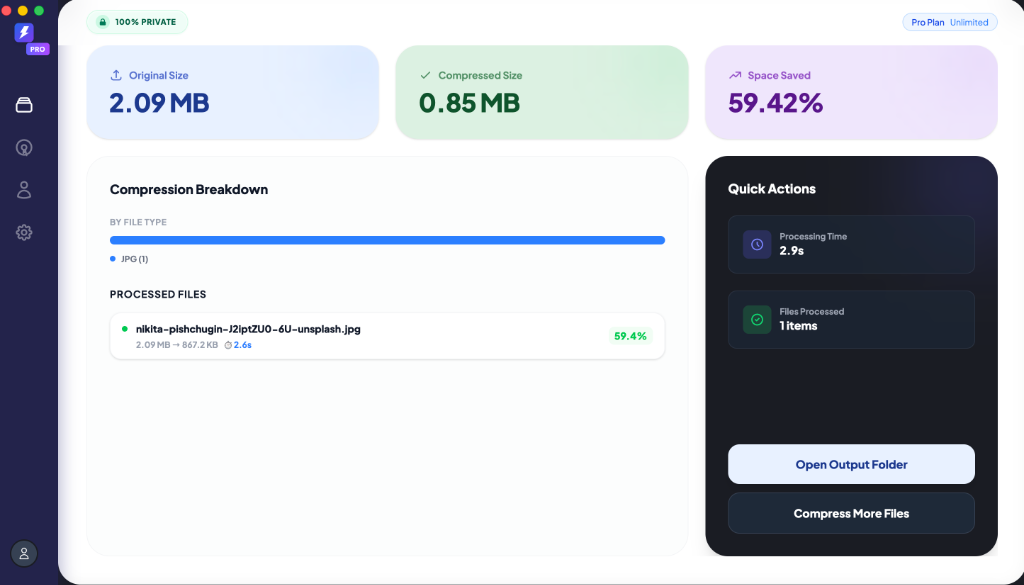
For most web use cases, both tools produce visually identical output. However, FastCompressor wins decisively on speed and workflow efficiency. Because it runs locally on your machine, it saves massive amounts of time—especially when you need to batch process dozens or hundreds of files at once, completely bypassing the slow upload and download cycles of web-based tools.
Who should use TinyPNG
- You compress fewer than 20 images at a time and they're all under 5 MB
- You run a WordPress site and want automatic compression on upload
- Your team needs API integration for an automated pipeline
Who should use FastCompressor
- You compress 20+ files at a time, or work with files over 5 MB
- Your images include client work, GPS data, or sensitive content that shouldn't leave your device
- Your workflow includes TIFF, AVIF, GIF, or video files
- You work on Windows, Mac, or Linux and want a native desktop app
- You want to pay once and never think about it again
Frequently asked questions
Is FastCompressor faster than TinyPNG?
For batches of 20 or more images, yes — significantly. TinyPNG requires uploading files to a server, waiting for processing, and downloading a ZIP file. FastCompressor compresses locally, so the only time is the CPU processing time. For a 100-image batch, FastCompressor typically finishes in 5–15 seconds. TinyPNG requires 5–6 minutes for the same batch.
Does FastCompressor work without TinyPNG's API?
Yes. FastCompressor is a standalone desktop app with no dependency on TinyPNG or any external API. It works fully offline.
Can I switch from TinyPNG to FastCompressor mid-project?
Yes. FastCompressor accepts the same input formats as TinyPNG (JPG, PNG, WebP, AVIF) and produces the same output formats. You can start using it on any new batch without any setup beyond downloading the app.
Does FastCompressor have a WordPress plugin?
No. FastCompressor is a desktop app that compresses files before you upload them. If you need automatic WordPress compression on upload, TinyPNG's plugin or ShortPixel are better options for that specific use case.
Which is cheaper long-term?
TinyPNG Pro costs $39/year. FastCompressor Pro costs $19 once. After the first year, TinyPNG Pro costs $39 more. After 3 years, you've paid $117 for TinyPNG vs $19 for FastCompressor — for tools that cover overlapping but not identical use cases.
Is FastCompressor safe to download?
Yes. FastCompressor is independently tested by Softpedia and listed as 100% clean.
Ready to try the offline alternative?
Download the free version today. Compress up to 20 images per session, completely free.