FastCompressor vs Squoosh: Which Should You Use? (2026)
These tools are built for different jobs. Squoosh is the best single-image compression tool available. FastCompressor is built for when you have more than one file.
Quick comparison
| Feature | Squoosh | FastCompressor (Free) | FastCompressor Pro |
|---|---|---|---|
| Price | Free | Free | $19 once — no renewal |
| Batch processing | One image at a time | Up to 20 per session | Unlimited |
| Files uploaded to server | Never | Never | Never |
| Works offline | PWA — yes after first load | Always | Always |
| Desktop app | PWA install only | Native app | Native app |
| File size limit | Limited by browser memory | Limited by browser memory | No limit |
| Side-by-side comparison | Yes — the best in class | Not available | Not available |
| TIFF support | No | Yes | Yes |
| Video compression | No | Yes | Yes |
| AVIF output | Yes | Yes | Yes |
| GIF compression | No | Yes | Yes |
| Folder watch / auto-compress | No | No | Yes (Pro) |
| EXIF/metadata removal | No | Manual | Batch removal |
| Windows support | Browser / PWA | Native app | Native app |
| Mac support | Browser / PWA | Native app | Native app |
| Linux support | Browser / PWA | Native app | Native app |
| CLI / Squoosh CLI | Deprecated (no longer maintained) | No | No |
Squoosh data sourced from squoosh.app and github.com/GoogleChromeLabs/squoosh, verified June 2026. FastCompressor data from fastcompressor.com.
The core difference: one file vs many files
Squoosh is a web-based image compression tool created to demonstrate the capabilities of modern browser technologies. It allows users to visually inspect compression results by offering a side-by-side comparison slider and real-time codec adjustments.
While Squoosh is an excellent tool for fine-tuning a single image, it completely lacks batch processing capabilities. Users must compress images one at a time, making it impractical for large-scale workflows. The Squoosh CLI, which once offered batch support, has been deprecated and is no longer maintained.
When you have 100 product photos, 200 Lightroom exports, or an entire folder of UI assets to compress, Squoosh requires you to compress each one individually. At 30 seconds per image, that's 50 minutes for 100 files.
FastCompressor processes the same 100 files in seconds. Drop a folder in, set a quality level, click Compress. The tradeoff: you don't get Squoosh's per-image comparison view.
Speed benchmark
Processing 100 JPG files averaging 3.2 MB each:
| Tool | Method | Time | |||| | Squoosh | One file at a time, manual | ~42 minutes | | FastCompressor | Batch (full folder) | ~2 minutes |
For a single hero image you want to perfect, Squoosh is faster because it gives you the right answer the first time. For anything over 5 images, FastCompressor is faster because it eliminates the manual per-file process entirely.
Upgrade your team's workflow
Stop processing files one by one. Get FastCompressor Pro for unlimited batch processing.
Get FastCompressor ProWhat Squoosh does better
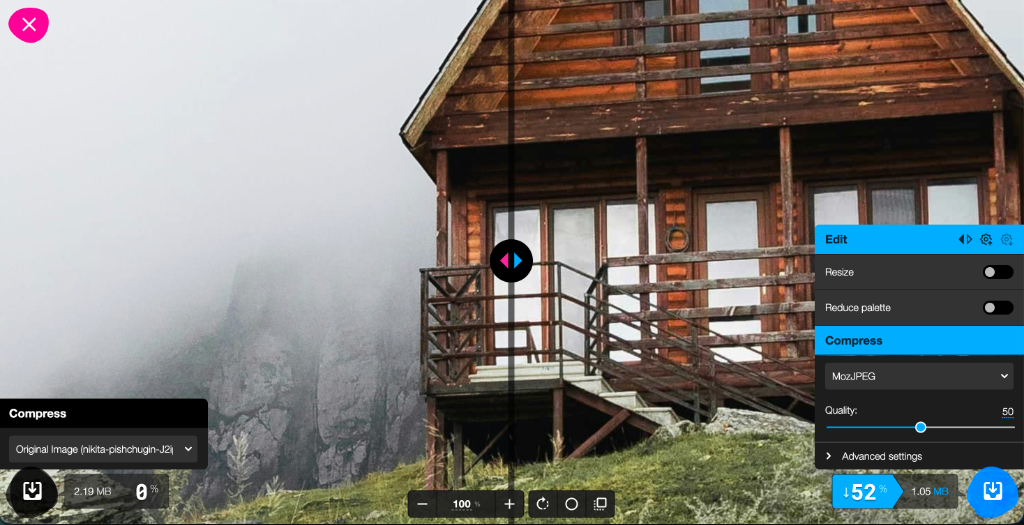
The comparison slider. Squoosh's killer feature is the split-screen before/after view. You can drag a divider across the image to compare the original and compressed version at pixel level, at any zoom, in real time as you adjust settings. Nothing else does this as well. If you're making an important decision about exactly how much to compress a hero image, Squoosh gives you information no other tool provides.
Codec control. Squoosh lets you switch between MozJPEG, OxiPNG, WebP, AVIF, and other codecs and see the exact file size and quality tradeoff for each, on your specific image. This is invaluable when choosing between formats for a production asset.
Where FastCompressor wins
Batch processing. Squoosh has been asked for batch processing in GitHub issues continuously since November 2018. As of June 2026, it still processes one image at a time with no queue, no multi-select, and no folder support. FastCompressor handles unlimited files in a single operation.
TIFF support. Squoosh does not support TIFF files. FastCompressor compresses TIFF losslessly using LZW or Deflate compression — essential for photographers, print designers, and archivists who work with TIFF regularly.
Video compression. Squoosh is images only. FastCompressor compresses MP4, MOV, and WebM natively in the same app — no second tool needed.
GIF compression. Squoosh does not support GIF compression. FastCompressor compresses animated GIFs using frame diffing and palette quantisation.
Native desktop app. Squoosh can be installed as a PWA (Progressive Web App), but it runs in a browser environment. FastCompressor is a native Mac, Windows, and Linux app — it launches faster, integrates with the OS, and doesn't require a browser.
Folder watch (Pro). FastCompressor Pro watches a folder and automatically compresses any new file saved to it — something Squoosh has no equivalent for.
Need to compress whole folders at once?
FastCompressor is built for bulk workflows. Just drag, drop, and compress thousands of files instantly.
Compression quality comparison
Both tools use the same underlying codecs for JPEG and PNG compression (MozJPEG, OxiPNG). For equivalent quality settings, output quality is comparable. The difference is workflow, not output.
Squoosh (Web UI)
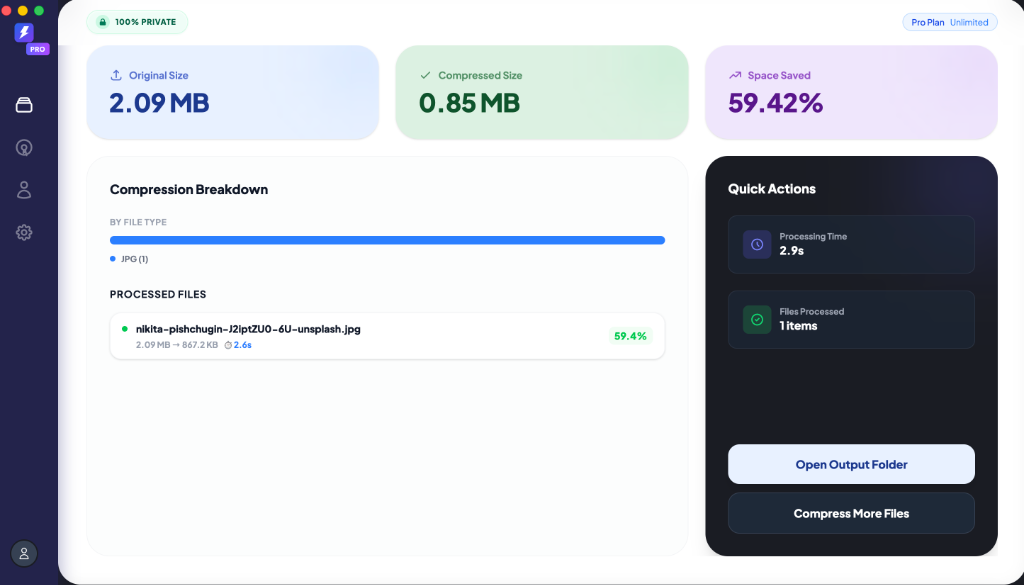
FastCompressor (Desktop App)
Who should use Squoosh
- You're compressing 1–3 important images and want pixel-level control
- You need to compare codecs visually before committing to a format
- You're a developer choosing between WebP and AVIF for a hero image
Who should use FastCompressor
- You're compressing 10 or more files at once
- Your workflow includes TIFF, GIF, or video files
- You want a native desktop app, not a browser tab
- You need folder automation (compress files as they're saved)
- You want to set a quality level once and apply it consistently across hundreds of files
Frequently asked questions
Why do users switch from Squoosh to FastCompressor?
Is the Squoosh CLI still maintained?
Does FastCompressor offer offline processing like Squoosh?
Ready to automate your image optimization?
Download the free version today. No credit card required, works on Mac, Windows, and Linux.