FastCompressor vs ImageOptim: Which Is Right for You? (2026)
Quick comparison
| Feature | ImageOptim (Desktop) | FastCompressor (Free) | FastCompressor Pro |
|---|---|---|---|
| Price | Free (donationware) | Free | $19 once — no renewal |
| Platform | macOS only | macOS, Windows, Linux | macOS, Windows, Linux |
| Formats supported | JPEG, PNG, GIF, SVG | JPG, PNG, WebP, TIFF, AVIF, GIF, video | JPG, PNG, WebP, TIFF, AVIF, GIF, video |
| TIFF support | No | Yes | Yes |
| WebP support | No | Yes | Yes |
| AVIF support | No | Yes | Yes |
| Video compression | No | Yes | Yes |
| Format conversion | No (optimize only) | Yes (e.g. JPG → WebP) | Yes |
| Files uploaded to server | Never | Never | Never |
| Works offline | Always | Always | Always |
| Batch processing | Unlimited (drag folder) | Up to 20 per session | Unlimited |
| EXIF/metadata removal | Auto (on by default) | Manual | Batch removal |
| Folder watch / auto-compress | CLI only | No | Yes (Pro) |
| Windows support | No | Yes | Yes |
| Linux support | No | Yes | Yes |
| Actively maintained | ! Limited (last major update 2021) | Active | Active |
What ImageOptim does (and does very well)
ImageOptim is a Mac-only utility that compresses JPEG, PNG, GIF, and SVG files. It operates by passing files through various open-source compression engines (such as MozJPEG and pngquant) and saving the smallest output. It focuses primarily on lossless compression.
By default, ImageOptim strips EXIF metadata (like GPS and timestamps), which can help reduce file sizes.
While ImageOptim is a free and straightforward option for users needing basic JPEG and PNG compression on macOS, it lacks support for modern formats like WebP or AVIF.
The gaps that make professionals switch
Windows and Linux are not supported. ImageOptim is macOS only. In 2016, a GitHub issue requested Windows support. In 2021, the ImageOptim maintainer publicly explained why it can't be built: the codebase is written in Objective-C and AppKit, tightly coupled to macOS frameworks that don't translate to other platforms. As of June 2026, Windows support has still never been delivered. If your team includes Windows or Linux users, they cannot use ImageOptim at all.
TIFF is not supported. ImageOptim silently rejects TIFF files. Photographers and print designers who work with Lightroom TIFF exports or archival scans have no option within ImageOptim. FastCompressor compresses TIFF losslessly using LZW or Deflate, automatically selecting the better algorithm based on the file's bit depth.
WebP and AVIF are not supported. ImageOptim supports four formats: JPEG, PNG, GIF, and SVG. A 2019 GitHub issue requesting WebP support was closed without the feature being added. In 2026, WebP has 97% browser support and AVIF is increasingly standard. ImageOptim cannot output either format.
No format conversion. ImageOptim can optimise a PNG but cannot convert it to WebP. FastCompressor converts between formats in the same compression operation — compress a folder of JPGs to WebP in one step.
No active development. The maintainer noted in a 2021 GitHub post that the codebase has become difficult to extend. The last significant update was in 2021. FastCompressor is actively maintained with regular updates.
Speed and compression comparison
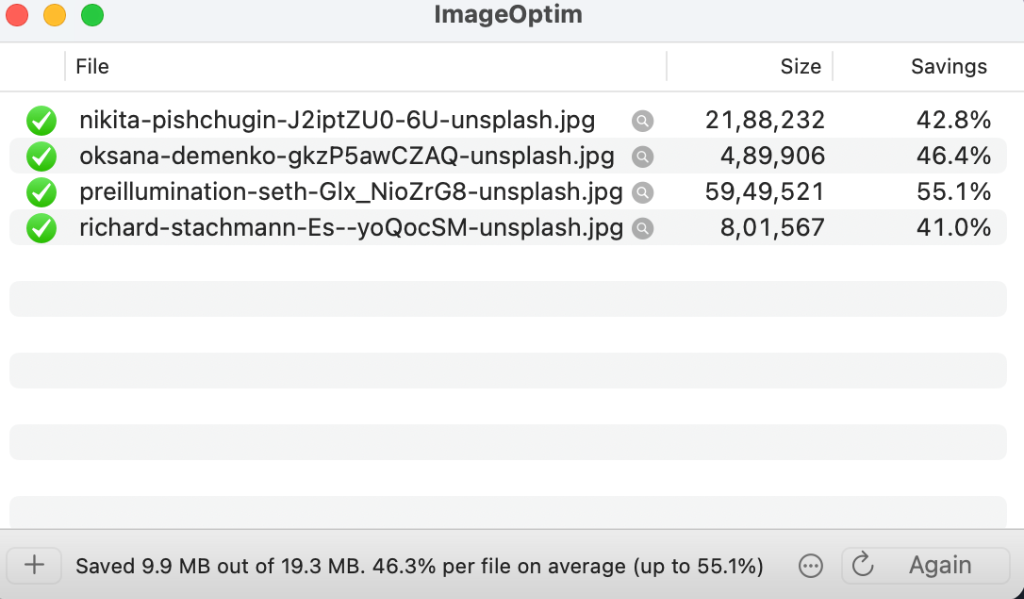
Both tools process locally with no upload. We tested both tools with a batch of 4 high-resolution JPG files (Original total size: ~18.4 MB).
ImageOptim (Lossless mode)
FastCompressor (Desktop App)
Quality 80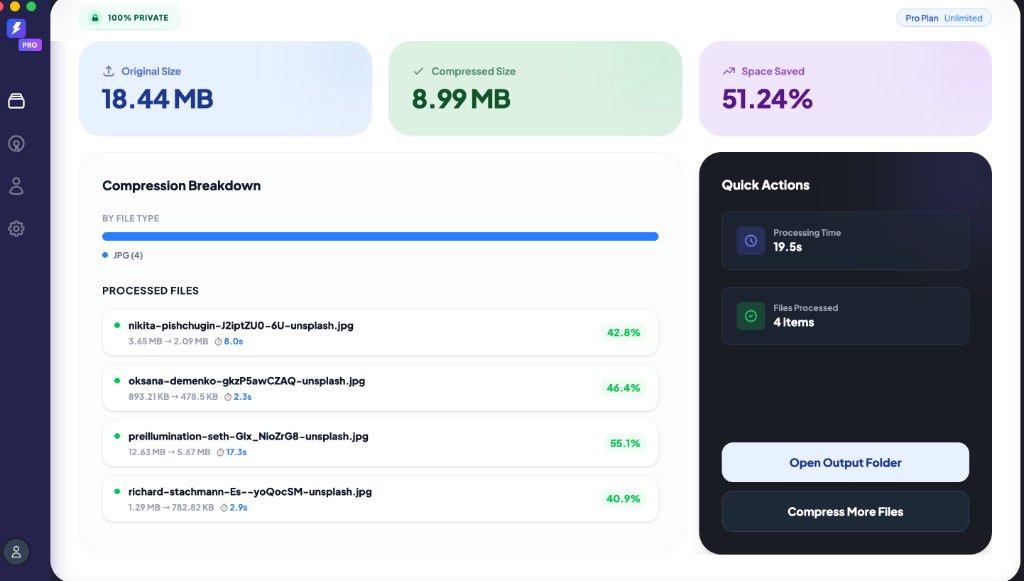
Who should use ImageOptim
- You work on a Mac and have no need for Windows or Linux support
- You compress only JPEG, PNG, GIF, or SVG files — no TIFF, WebP, AVIF, or video
- You have an existing CLI pipeline built around ImageOptim that's working
Who should use FastCompressor
- You work on a team that includes Windows or Linux machines
- Your workflow includes TIFF files — Lightroom exports, scanned documents, print assets
- You need to output WebP or AVIF (modern web formats)
- You need video compression alongside image compression
- You want control over compression quality rather than automatic output
- You need folder watch automation (Pro) — compress files as they're saved
- Your ImageOptim version is throwing errors on modern format files
Use both if
You're a solo Mac developer who only needs JPEG and PNG for web use — ImageOptim for the free lossless pass, FastCompressor for TIFF or video work when those come up.
Real workflow examples
Photography studio (rejected ImageOptim):
A wedding photographer delivering 500 edited TIFFs to a client tried ImageOptim. It rejected every file silently — TIFF is not supported. They switched to FastCompressor, which compressed the full 500-file TIFF delivery in under 3 minutes with lossless LZW compression.
Need to compress TIFFs?
FastCompressor supports TIFF, AVIF, WebP, and Video out of the box.
Design agency on Mac and Windows:
The Mac designers used ImageOptim. The Windows team had no equivalent tool. Switching to FastCompressor standardised the compression workflow across all platforms — same app, same quality settings, same output on every machine.
Frequently asked questions
Why do professionals switch from ImageOptim to FastCompressor?
Does FastCompressor compress files better than ImageOptim?
Can I use FastCompressor to convert images to WebP?
Is FastCompressor available for Windows and Linux?
Still not sure?
Download the free version today. No credit card required, no time limit.