FastCompressor vs Compressor.io: Full Comparison (2026)
Quick comparison
| Feature | Compressor.io (Free) | Compressor.io Pro | FastCompressor (Free) | FastCompressor Pro |
|---|---|---|---|---|
| Price | Free | From $50/year | Free | $19 once — no renewal |
| Images per session | 1 at a time | Varies by plan | Up to 20 per session | Unlimited |
| Batch processing | One at a time | Limited | Up to 20 | Unlimited |
| File size limit | 10 MB per file | Varies by plan | No limit | No limit |
| Files uploaded to server | Always | Always | Never | Never |
| Works offline | No | No | Yes | Yes |
| Desktop app | No | No | Native app | Native app |
| Formats supported | JPEG, PNG, SVG, GIF, WebP | JPEG, PNG, SVG, GIF, WebP | JPG, PNG, WebP, TIFF, AVIF, GIF, video | JPG, PNG, WebP, TIFF, AVIF, GIF, video |
| TIFF support | No | No | Yes | Yes |
| AVIF support | No | No | Yes | Yes |
| Video compression | No | No | Yes | Yes |
| Lossy compression | Yes (free) | Yes | Yes | Yes |
| Lossless compression | Yes (free) | Yes | Yes | Yes |
| Folder watch / auto-compress | No | No | No | Yes (Pro) |
| Batch EXIF removal | No | No | Manual | Yes |
| Windows support | Browser | Browser | Native app | Native app |
| Mac support | Browser | Browser | Native app | Native app |
| Linux support | Browser | Browser | Native app | Native app |
The core difference: one image vs a folder
Compressor.io is a clean, capable single-image tool. You drop one file in, choose lossy or lossless, see the before/after slider, and download. For that specific use case — compressing one image, right now, in a browser — it is genuinely fast and well-designed.
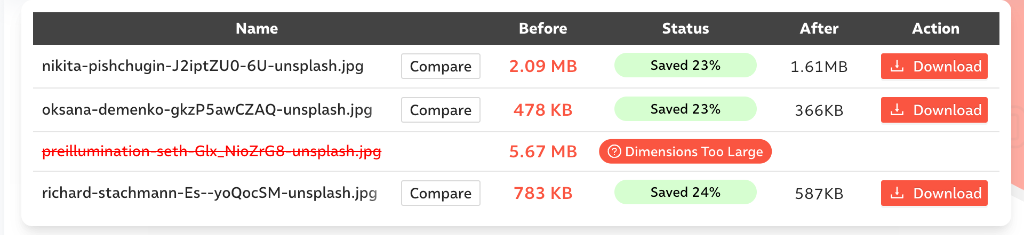
While Compressor.io allows you to upload multiple files, it relies heavily on your browser's memory and internet connection. If a file is too large or your internet stutters, the process fails or throws a "Dimensions Too Large" error.
FastCompressor drops a folder in and processes every file simultaneously. The gap between the two approaches grows with every additional file.
Speed and compression comparison
We tested both tools with a batch of 4 high-resolution JPG files. Compressor.io processed 3 of the files but failed on the largest one (5.67 MB) with a "Dimensions Too Large" error. FastCompressor successfully processed all 4 files locally in under 11 seconds.
Compressor.io (Web UI)
FastCompressor (Desktop App)
Quality 80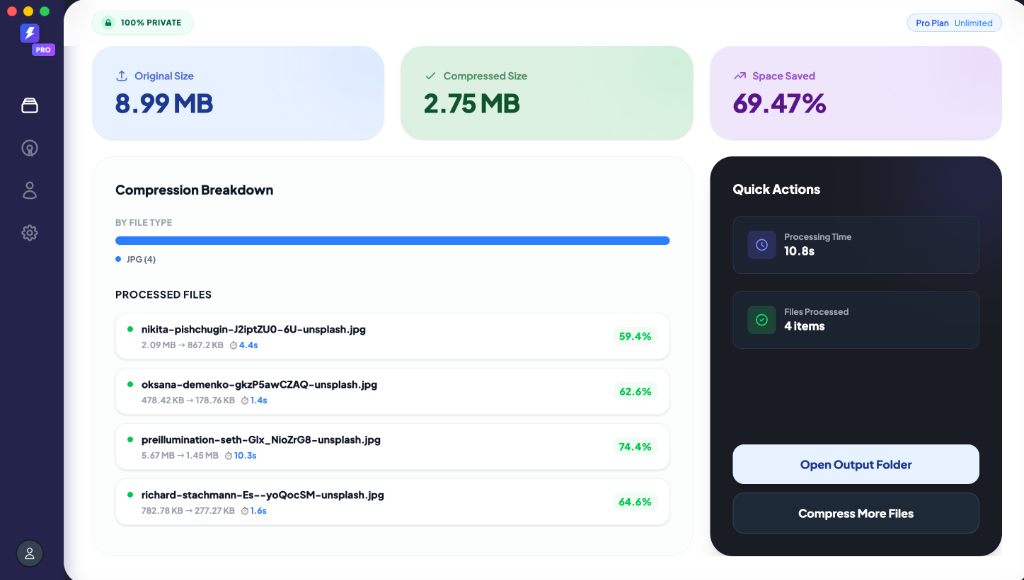
Compression quality
Compressor.io's lossy mode achieves file size reductions of 70–85% on JPGs and 50–65% on PNGs. Speed is 2–3 seconds per image. For aggressive lossy compression, it performs well.
One downside noted in testing: slight artifacts on high-detail photographs compared to other tools when using aggressive lossy settings.
FastCompressor at equivalent quality settings produces comparable output. Both tools use industry-standard compression algorithms. The meaningful differences are workflow and privacy — not output quality at normal quality settings.
For a 2.09 MB JPG product photo:
- Compressor.io (lossy): ~1.61 MB (23% reduction)
- FastCompressor at quality 80: ~867 KB (59.4% reduction)
What Compressor.io does better
Before/after comparison slider. Compressor.io also offers a before-and-after slider similar to some other tools. This lets you compare the original and optimized images side by side. FastCompressor currently has no equivalent visual comparison.
Save directly to Google Drive or Dropbox. In addition to the standard download, it also has the convenient option of saving the processed images directly to Google Drive or Dropbox. For teams working in shared cloud folders, this removes one step from the workflow.
Where FastCompressor wins
Batch processing — the decisive difference. FastCompressor processes 20 images per session on the free plan and unlimited on Pro. Compressor.io is constrained by browser memory and upload limits, failing on large files. For anyone compressing more than a handful of files, this is not a close comparison.
Zero file uploads, ever. Every image you send to Compressor.io is uploaded to their servers. For client photos, images under NDA, medical images, or anything sensitive, this is a meaningful risk. FastCompressor processes everything locally — your files never leave your device.
No file size limit. Compressor.io has a 10 MB file size limit on the free tier. A single Lightroom TIFF, RAW export, or high-resolution product photo can easily exceed this. FastCompressor has no per-file size limit on either tier.
TIFF compression. Compressor.io does not support TIFF files. FastCompressor compresses TIFF losslessly using LZW or Deflate — essential for photographers, print designers, and archivists.
AVIF support. Compressor.io does not support AVIF. FastCompressor does — useful for teams adopting next-generation image formats for web performance.
Video compression. Compressor.io is images only. FastCompressor compresses MP4, MOV, and WebM from the same app.
Works offline. No internet connection required. Compress images on a plane, in a secure office, or anywhere without connectivity.
One-time price. Compressor.io Pro starts at $50/year. FastCompressor Pro is $19 once — no annual renewal, ever. Over two years, Compressor.io Pro costs $100. FastCompressor Pro costs $19.
Who should use Compressor.io
- You compress one or two images at a time, occasionally
- You need SVG compression
- You want lossless compression in a browser without installing anything
- You prefer saving output directly to Google Drive or Dropbox
- You don't handle sensitive or private images
Who should use FastCompressor
- You compress more than 5 images at a time, regularly
- Your workflow includes TIFF, AVIF, or video files
- Your images are private, sensitive, or covered by an NDA
- You want a native desktop app, not a browser tab
- You want to pay once and not manage a subscription
Frequently asked questions
Can Compressor.io handle large high-resolution images?
Is FastCompressor really faster than Compressor.io?
Which tool offers better compression quality?
What happens if my internet connection drops?
Which is more cost-effective for a professional?
Last updated: June 2026.
Get FastCompressor Pro — $19 once →
Download free — up to 20 images per session →
30-day money-back guarantee · macOS, Windows & Linux · No subscription